Bring your Articulate Rise library to CourseAgent in under 10 seconds.
Keep the content you've already invested in - and instantly add modern multilingual delivery, AI narration, AI authoring and Presenter Mode for live training on top. No rebuild. No XLIFF round-trip. No starting over.
What your imported course gains on day one
Three things your course unlocks the moment it lands in CourseAgent.
Free 90-language translation
One click per language. End-to-end - including interactions, quizzes and feedback. No XLIFF round-trip, no translation vendor round-trip.
Built-in AI narration on every plan
AI narration included on every plan, in all 90 supported languages - so a translated course is also a narrated course, with no extra step.
AI authoring included as standard
AI course generation, section transformer, AI quizzes from your own content and AI image generation - included on every CourseAgent plan, so AI authoring isn't gated to a higher tier.
How the import works
Three steps. Typical course under 10 seconds.
Use Rise's standard course export. No plugin, no manual rebuild, no XLIFF gymnastics.
CourseAgent reconstructs your course as a native, fully editable course - typically in under 10 seconds.
Apply your design system, translate into 90 languages, add AI narration, publish through your Academy or as SCORM.
What gets converted
- Course structure - lessons, sections, ordering and titles
- Text content - headings, body copy, lists, quotes, captions
- Media - images, video embeds and supporting files
- Interactions and knowledge checks - mapped to CourseAgent's richer interaction library
Conversion is the ideal moment to apply your CourseAgent design system - colour scheme, typography pair and brand tokens - so the upgraded course launches on-brand from day one.
Also exporting from Adapt? CourseAgent supports Adapt imports too - get in touch and we'll walk you through it.
Side by side
How CourseAgent complements your Rise library.
Here's how the two platforms compare on the workflows that matter most once a library scales - so you can see where CourseAgent fits alongside what you already have.
Rise update and presentation sources checked on 8 November 2026. Features, plan eligibility and prices may change - confirm your requirements with Articulate.
| Feature | CourseAgent | Articulate Rise |
|---|---|---|
| Import existing Articulate Rise courses | Yes - typically under 10 seconds, fully editable | N/A |
| AI authoring (generation, rewriting, transforms, AI quizzes) | Included on every plan | Full AI authoring sits on the AI tier (US$1,749/user/year per Articulate's public pricing) |
| Translation into 90 languages | One click, end-to-end, included | Native XLIFF export/import workflow, or the Articulate Localization add-on |
| AI narration (TTS) | Included on every plan, in all 90 supported languages, re-narrates in seconds after an edit | Available via AI Assistant on the AI tier |
| Branded learner portal / LMS | Professional and above - branded Academy LMS, certificates and CPD | Delivered via Reach 360 or your own LMS |
| Design system & branding | Account-scoped design tokens, typography pairs, dark-mode safe overlays | Theme picker with fonts, colours and block variants |
| Live updates in your LMS (Dynamic SCORM) | Professional and above - production Dynamic SCORM loads the latest published version without re-uploading | Rise Connected Packages - Articulate describes live LMS content updates on Articulate 360 AI; confirm eligibility and your LMS setup. Standard exports still require re-uploading |
| Live presentation and facilitator tools | Presenter Mode - live slides, facilitator tools, published-language switching, approved palettes and narration that starts muted | Rise supports live or virtual presentation use; equivalent private, session-only facilitator controls are not verified |
| Course Tutor | Course-aware AI support for learner questions | AI Assistant supports authors; learner tutoring depends on your delivery setup |
| Compliance sign-off | Professional and above - learner acknowledgement and audit trail, not a digital signature | Acknowledgement and audit requirements depend on your LMS and course setup |
| Starting price | 7-day free trial of Professional; Lite from £20/month ex-VAT | AI Teams US$1,749/user/year (per Articulate's public pricing - check articulate.com for current rates) |
Import existing Articulate Rise courses
CourseAgent
Yes - typically under 10 seconds, fully editable
Articulate Rise
N/A
AI authoring (generation, rewriting, transforms, AI quizzes)
CourseAgent
Included on every plan
Articulate Rise
Full AI authoring sits on the AI tier (US$1,749/user/year per Articulate's public pricing)
Translation into 90 languages
CourseAgent
One click, end-to-end, included
Articulate Rise
Native XLIFF export/import workflow, or the Articulate Localization add-on
AI narration (TTS)
CourseAgent
Included on every plan, in all 90 supported languages, re-narrates in seconds after an edit
Articulate Rise
Available via AI Assistant on the AI tier
Branded learner portal / LMS
CourseAgent
Professional and above - branded Academy LMS, certificates and CPD
Articulate Rise
Delivered via Reach 360 or your own LMS
Design system & branding
CourseAgent
Account-scoped design tokens, typography pairs, dark-mode safe overlays
Articulate Rise
Theme picker with fonts, colours and block variants
Live updates in your LMS (Dynamic SCORM)
CourseAgent
Professional and above - production Dynamic SCORM loads the latest published version without re-uploading
Articulate Rise
Rise Connected Packages - Articulate describes live LMS content updates on Articulate 360 AI; confirm eligibility and your LMS setup. Standard exports still require re-uploading
Live presentation and facilitator tools
CourseAgent
Presenter Mode - live slides, facilitator tools, published-language switching, approved palettes and narration that starts muted
Articulate Rise
Rise supports live or virtual presentation use; equivalent private, session-only facilitator controls are not verified
Course Tutor
CourseAgent
Course-aware AI support for learner questions
Articulate Rise
AI Assistant supports authors; learner tutoring depends on your delivery setup
Compliance sign-off
CourseAgent
Professional and above - learner acknowledgement and audit trail, not a digital signature
Articulate Rise
Acknowledgement and audit requirements depend on your LMS and course setup
Starting price
CourseAgent
7-day free trial of Professional; Lite from £20/month ex-VAT
Articulate Rise
AI Teams US$1,749/user/year (per Articulate's public pricing - check articulate.com for current rates)
Once imported, your CourseAgent course can also support live delivery without a separate slide deck. Explore Presenter Mode for facilitator tools and learner slide view with the course's configured rules.
See the full Articulate comparisonBuild once. Scroll or present.
Turn your Rise library into live training without a second slide deck.
Import your course, review the conversion and preview the slides. The same content can then serve independent learners and a live classroom or webinar - without maintaining two versions.
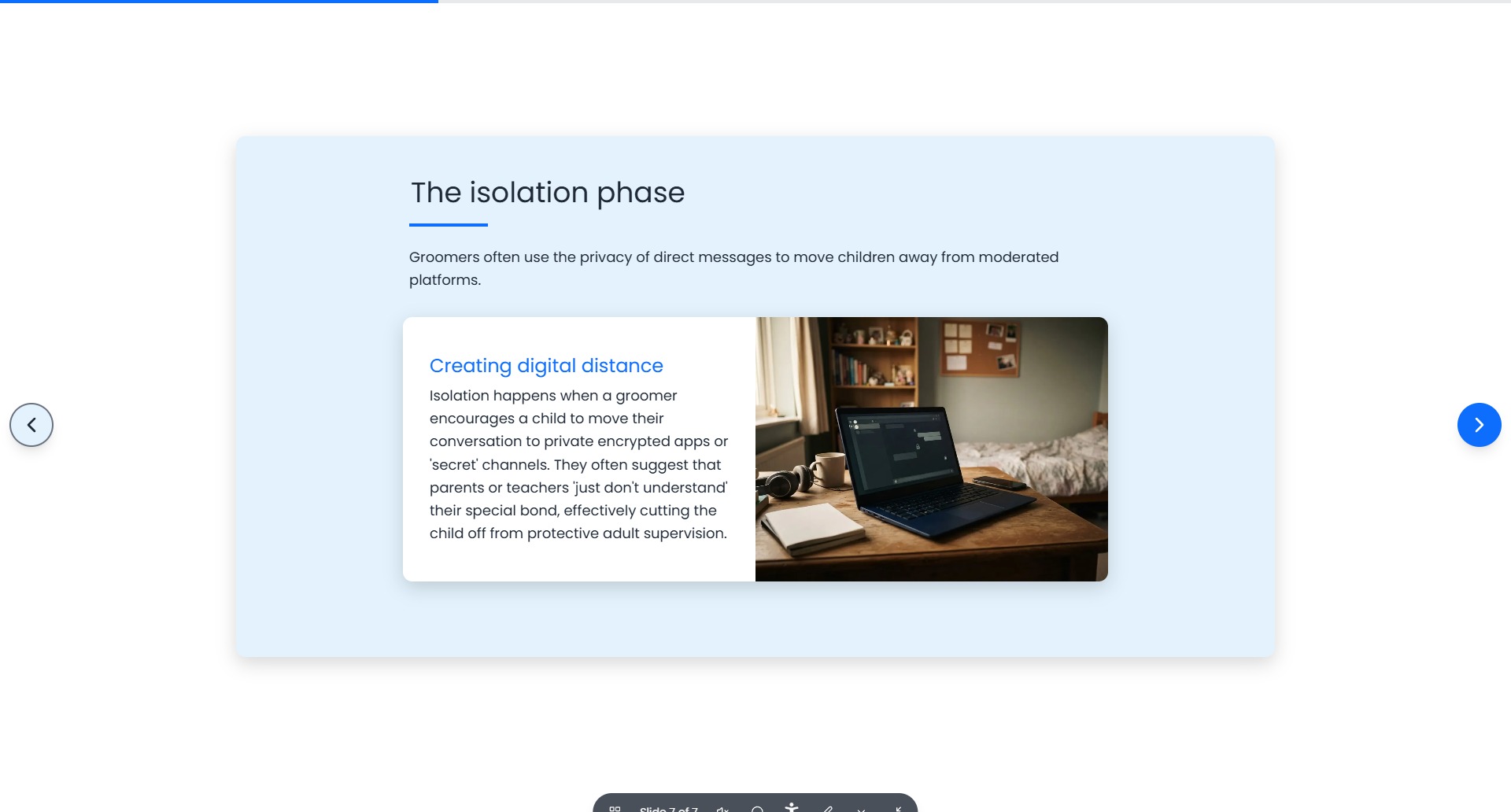
Rise: scrolling or screen sharing
A Rise course can be shared on screen during a live session. If you want a separate slide deck, that introduces another version to build and maintain; screen sharing is not a dedicated facilitator toolset.
CourseAgent: the same course, presented live
Use a private Presenter Link for slide navigation, session-only drawing tools and interactive checks. Switch between prepared published languages, offer author-approved colour palettes and start with narration muted. Course buttons and lesson-page backdrops keep the session on brand.
Facilitator sessions do not generate learner scores or certificates. Learners retain configured rules, but progress does not transfer between language courses. Trainers need each language's own private link. Palette choices are optional; embedded media keeps separate audio controls. Desktop and tablet support Presenter Mode; phones keep scrolling view.
Start with the plan that fits your team
Professional includes 1 author at £35/month ex-VAT. Scale starts at £85/month ex-VAT with 1 author included, and supports up to 3 authors with extra seats at £30/author/month. The 7-day free trial follows Professional.
Lite, Professional and Scale are for organisations with up to 200 employees. For larger organisations, choose Organisation or Elite. Training providers count their own staff, not the clients or learners they sell to.
See plans, course limits and annual pricingMigration FAQ
The questions every L&D team asks first.
Is the import really under 10 seconds?+
Yes - typical Articulate Rise courses convert in under 10 seconds. Very large libraries with extensive media may take a little longer, but the process is unattended.
What gets converted, and what doesn't?+
Structure, text, images, video embeds, supporting files, interactions and knowledge checks are converted into native, fully editable CourseAgent sections. Highly custom Storyline-style embeds and certain bespoke widgets are flagged for review during conversion so you can replace them with CourseAgent's interaction equivalents.
What happens to SCORM packages I've already deployed in my LMS?+
Nothing - your existing SCORM exports keep running in your LMS. After conversion, Professional and above can publish a new Dynamic SCORM package so future published updates flow through without re-uploading. Standalone offline SCORM ZIP exports are available on Organisation and Elite. Lite publishes by web link, not SCORM.
Can I re-translate after I edit the converted course?+
Yes. CourseAgent's deep-copy translation model keeps each language independent and safe to re-run after edits. Translation is one click per language, end-to-end, and free.
Do I have to switch all my authors at once?+
No. Most teams import a few representative Rise courses first, publish them through CourseAgent, then migrate the rest of the library at their own pace. You don't have to cancel Articulate to start.
Can I present my imported Rise course in a live training session?+
Yes. Import your Rise course, check the converted content and slide layout, then publish and share a private Presenter Link with your facilitator. Presenter Mode turns the same CourseAgent course into widescreen slides with navigation, drawing tools and interactive checks - without maintaining a separate PowerPoint deck. Facilitator sessions do not create learner scores or certificates. Learners can use scrolling view or, when enabled, Presenter view with the same configured progress and completion rules. Presenter Mode works on desktop and tablet; phones keep scrolling view.
Start your 7-day free trial today.
Full Professional access. No credit card. No technical skills required.
Just describe what you want to teach.